
Database modeler for PostgreSQL, MySQL, MariaDB and SQL Server
Database models
stored as JSON in Git.
Schevo imports a schema from a SQL script or a live database, shows it as an editable ER diagram and saves it as a folder with one JSON file per table, ready for version control with Git. Saving also regenerates the creation script.
- 30-day trial, no sign-up
- Works offline
- Windows and Linux
- English, Spanish, German and French
From SQL script to repository
- 1
Import
Open a
CREATE TABLEscript or connect to the database. Tables, columns, keys, indexes and relationships are imported, and the diagram is laid out automatically. - 2
Model
Edit tables, columns and relationships on the diagram or in the table editor. Any change can be undone with Ctrl+Z.
- 3
Commit
Saving writes one JSON file per table and regenerates the linked SQL script. Both go in the same commit.
Features
The videos show the application with its bundled online-shop sample.
Import
Import from a SQL script or a live database
Schevo reads creation scripts and schema dumps, or queries the catalog of a running database. It imports tables, columns, primary and foreign keys, unique and check constraints, indexes and comments. The diagram is laid out automatically: tables grouped by prefix, parent tables to the left of their children and one color per group.
- Statements the diagram does not represent (views, functions, triggers, sequences, types) are stored in
extra.sqland written back to the generated SQL. - Statements that cannot be parsed are listed with their line number and kept in the SQL.
- The database connection only runs read-only catalog queries. Host, port, database and user name are remembered; the password is never stored.
Engines
Engines: PostgreSQL, MySQL, MariaDB and SQL Server
Each model has an engine, stored in project.json. For all of them, Schevo imports scripts and databases, generates creation SQL in the engine's syntax, compares versions and generates migrations. The diagram, the JSON format and the command line are the same.
- Live databases: PostgreSQL 10 or later, MySQL 8.0 or later, MariaDB 10.6 or later, SQL Server 2017 or later and Azure SQL Database.
- MySQL and MariaDB, including schema dumps:
AUTO_INCREMENT,UNSIGNED,ENUM/SET, generated columns,ON UPDATE,FULLTEXTandSPATIALindexes and table options. - The table editor shows the attributes of the model's engine; for MySQL and MariaDB, storage engine, character set, collation,
ON UPDATE, generated columns and index type. - Long
ENUMandSETtypes are abbreviated on the diagram; the full type is shown in the tooltip and in the editor. - MySQL and MariaDB migrations use
MODIFY COLUMNwith the full definition, and their header notes that DDL on these engines is not transactional. - SQL Server: T-SQL scripts with
GObatches and bracketed identifiers,IDENTITY,PERSISTEDcomputed columns, clustered and nonclustered indexes withINCLUDEand filters, namedDEFAULTconstraints, collations and comments as extended properties (MS_Description). - SQL Server migrations run as a single transaction with
SET XACT_ABORT ON: if one statement fails, none is applied. Renames usesp_rename.
CREATE TABLE ord_cart (
                cart_id BIGINT UNSIGNED NOT NULL,
                customer_id BIGINT UNSIGNED,
                session_id CHAR(36) NOT NULL COMMENT 'Browser session, for guest carts.',
                coupon_id BIGINT UNSIGNED,
                created_at DATETIME(3) NOT NULL DEFAULT CURRENT_TIMESTAMP(3),
                updated_at DATETIME(3) NOT NULL DEFAULT CURRENT_TIMESTAMP(3) ON UPDATE CURRENT_TIMESTAMP(3),
                PRIMARY KEY (cart_id),
                UNIQUE KEY ord_cart_session_idx (session_id)
) COMMENT='Open carts, from registered customers or guests.';CREATE TABLE dbo.ord_order_line (
order_id BIGINT NOT NULL,
line_no SMALLINT NOT NULL,
variant_id BIGINT NOT NULL,
description NVARCHAR(200) NOT NULL,
quantity SMALLINT NOT NULL,
unit_price DECIMAL(12,2) NOT NULL,
discount DECIMAL(12,2) NOT NULL CONSTRAINT ord_order_line_discount_df DEFAULT 0,
tax_code VARCHAR(10) NOT NULL,
amount AS (quantity * unit_price - discount) PERSISTED NOT NULL,
CONSTRAINT ord_order_line_pk PRIMARY KEY (order_id, line_no),
CONSTRAINT ord_order_line_quantity_check CHECK (quantity > 0)
);
GOEdit
Keyboard editing on the diagram
T creates a table at the cursor. C adds columns to the selected table from a line such as amount numeric(10,2) not null. Alt + drag from the child table to the parent creates the relationship. Clicking a column highlights the relationships that use it, and any change can be undone with Ctrl+Z.
- Renaming a table updates the foreign keys that reference it and the PK and FK names that follow the naming convention.
- A type change on a referenced column propagates to the FK columns of the child tables, down the chain.
- Zones, notes, minimap, compact mode (PK and FK columns only) and a dark theme.
On-disk format
A model built for version control: one JSON file per table
A model is a folder: project.json, a tables/ folder with one file per table and, when they have content, extra.sql and diagram.json. The output is deterministic: fixed property order, LF line endings and one property per line. Only the files that change are rewritten.
- Plain text files you can read and edit without Schevo.
- No binary files, no locks and no local database.
db-model/
  project.json
  extra.sql
  tables/
    public.cat_attribute.json
    public.cat_brand.json
    public.cat_category.json
    public.cat_image.json
    public.cat_price_history.json
… (62 files){
"name" : "ord_cart",
"schema" : "public",
"comment" : "Open carts, from registered customers or guests.",
"columns" : [
{
"name" : "cart_id",
"type" : "BIGINT",
"nullable" : false
},
{
"name" : "customer_id",
"type" : "BIGINT",
"nullable" : true
},
{
"name" : "session_id",
"type" : "UUID",
"nullable" : false,
"comment" : "Browser session, for guest carts."
},
{
"name" : "coupon_id",
"type" : "BIGINT",
"nullable" : true
},
…Git
Version control with Git: readable diffs and per-table merges
Each table lives in its own file and the format does not change between saves, so a diff shows only the lines that were modified. Two people editing different tables change different files, so merging schema changes is an ordinary Git merge. Moving a table only changes its x and y values.
- After a
git pullor a branch switch, the open model reloads if there are no unsaved changes; otherwise you are offered a reload. - When the model is opened, unresolved conflict markers are reported with file and line.
schevo-cli checkin CI fails if the SQL is out of sync with the model.
$ git diff
--- a/db-model/tables/public.cus_customer.json
+++ b/db-model/tables/public.cus_customer.json
@@ -10,2 +10,8 @@
     },
+    {
+      "name" : "loyalty_points",
+      "type" : "INTEGER",
+      "nullable" : false,
+      "default" : "0"
+    },
     {
@@ -140,3 +146,3 @@
   "layout" : {
-    "x" : 1671,
+    "x" : 1911,
     "y" : 40,
SQL
Creation SQL with a diff preview
The creation script has a fixed format: tables in alphabetical order, primary key, unique and check constraints inside each table, indexes right after it and foreign keys at the end as ALTER TABLE. Ctrl+G opens a preview with the lines added and removed compared with the file on disk.
- Copy it, save it to the linked file or save it to another file.
- Saving the model regenerates the linked script, with LF or CRLF line endings as set in the project.
CREATE TABLE public.ord_cart (
                cart_id BIGINT NOT NULL,
                customer_id BIGINT,
                session_id UUID NOT NULL,
                coupon_id BIGINT,
                created_at TIMESTAMP WITH TIME ZONE DEFAULT now() NOT NULL,
                updated_at TIMESTAMP WITH TIME ZONE DEFAULT now() NOT NULL,
                CONSTRAINT ord_cart_pk PRIMARY KEY (cart_id)
);

ALTER TABLE public.ord_cart ADD CONSTRAINT cus_customer_ord_cart_fk
FOREIGN KEY (customer_id)
REFERENCES public.cus_customer (customer_id)
ON DELETE CASCADE
ON UPDATE NO ACTION
NOT DEFERRABLE;
Migrations
Migrations from Git, another model or a live database
Pick the starting version (a Git revision, the last saved version, another model, a SQL script or a live database) and Schevo generates the ALTER script that takes it to the current model. Affected foreign keys are dropped before the changes and recreated at the end. On PostgreSQL and SQL Server, the script runs inside a transaction.
- Possible table and column renames are offered as checkboxes and written as
RENAME(sp_renameon SQL Server) instead of drop and create. - A foreign key is recreated only when its columns or the parent table's key change.
- From the command line:
schevo-cli migratewith--git,--fromor--from-db, plus--renameor--detect-renames.
Compare
Version comparison on the diagram
Compare the open model with a Git revision, the last saved version, another model, a SQL script or a live database. New tables are marked in green; modified ones in amber, with the changed columns highlighted; removed tables are drawn as ghosts at their previous position. The change list takes you to each table. Models of different engines can be compared too.
Validation
Validation as you edit
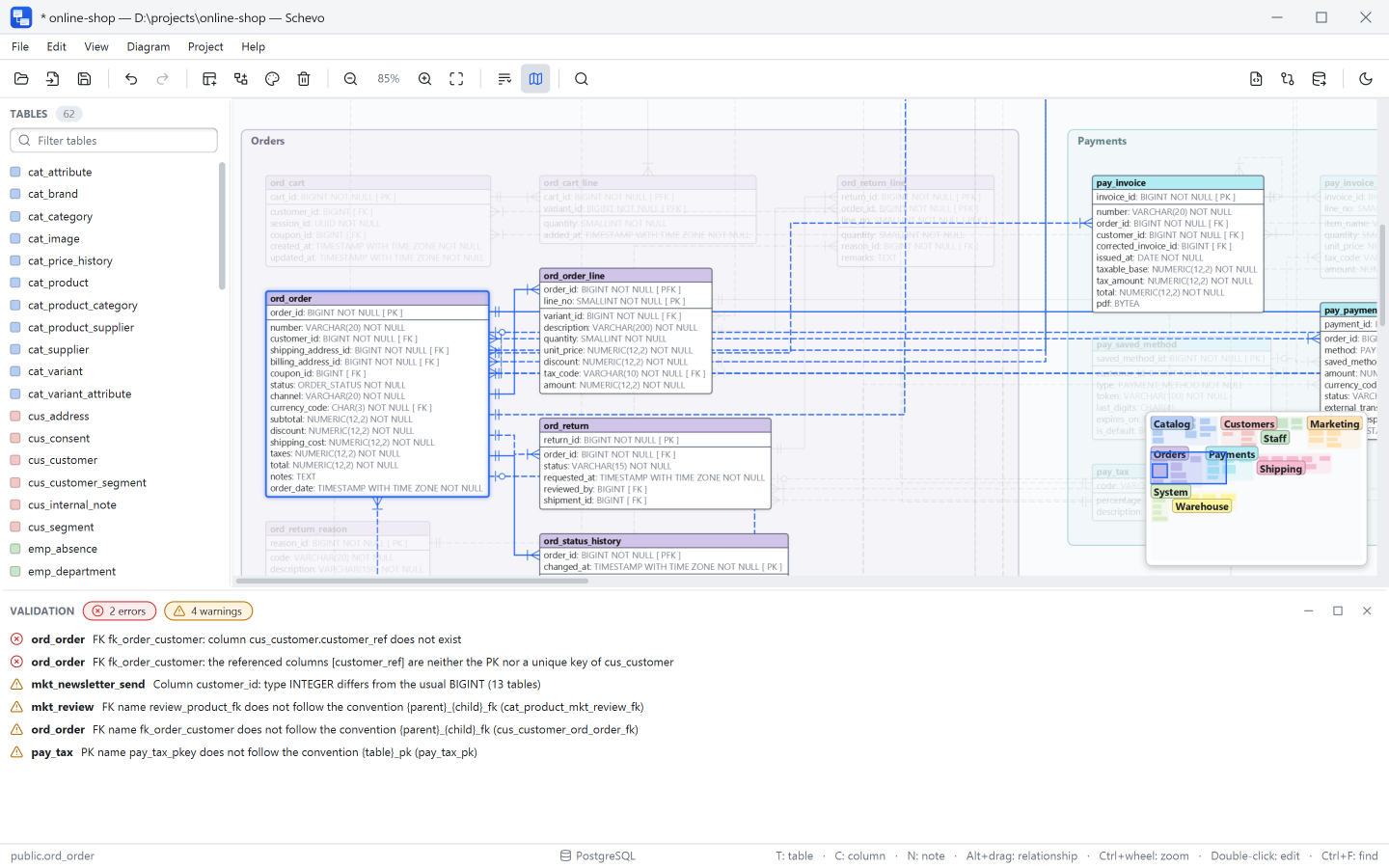
The validation panel updates on every change and separates errors from warnings. Errors: foreign keys to missing columns, nullable primary keys, duplicate names, SET NULL on NOT NULL columns. Warnings: mismatched types across a relationship, CASCADE cycles, reserved words and names that break the project's naming rules. Each engine adds its own rules: maximum identifier length, AUTO_INCREMENT columns, character set and collation across MySQL foreign keys, clustered indexes and cascade paths on SQL Server. schevo-cli validate applies the same rules.
Export
PNG, SVG and PDF export, and a data dictionary
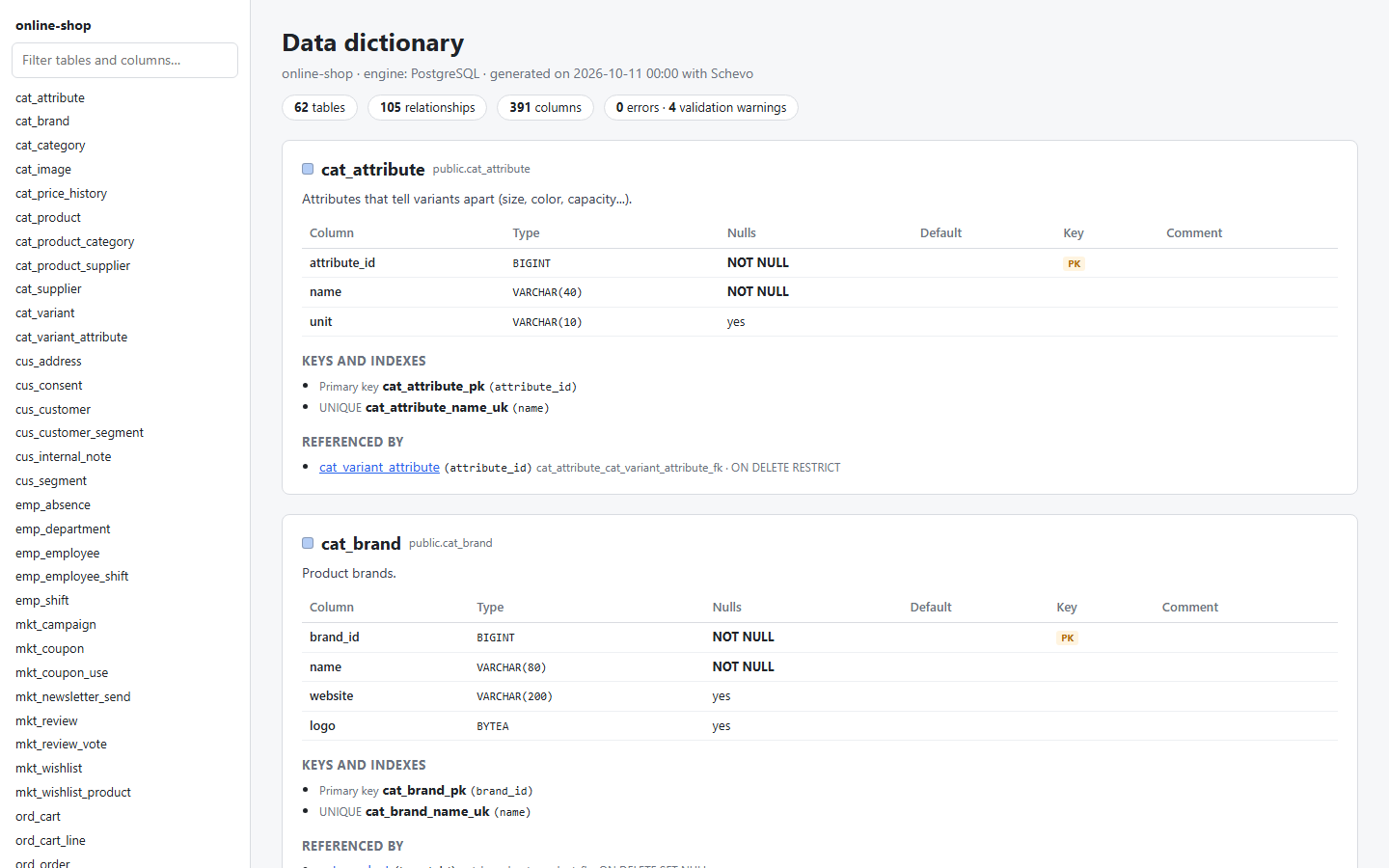
The diagram exports to PNG, SVG or PDF, always in the light theme. The data dictionary is a self-contained HTML file with the diagram, a searchable index and a section per table with its columns, keys, indexes and comments.
Command line
Command line for CI
schevo-cli is installed with the application. validate exits with 0 when there are no errors, 1 when there are and 2 when the model cannot be read; check also verifies that the SQL is in sync. Both are free, with or without a license. import, generate, migrate and doc require a license and exit with 3 without one.
# CI job — fail the merge request if the model
# has errors or the SQL was not regenerated
schema-check:
  image: eclipse-temurin:17-jre
  script:
    - java -jar tools/schevo.jar check db-model

$ java -jar tools/schevo.jar check db-model
OK: valid model and SQL in sync
More features
Search
Ctrl+F searches tables, columns, relationships, indexes, constraints and comments.
Zones and notes
Colored zones that move with their tables, and text notes on the diagram.
Multiple windows
One model per window. Tables can be copied and pasted between windows.
Recovery copies
Every 2 minutes while there are unsaved changes. After an unexpected exit, you are offered the copy.
Naming rules
Templates for PK, FK, unique constraint and index names. Used when proposing names and when validating.
Light and dark themes
Ctrl+Shift+D switches themes. Exports always use the light one.
Four languages
Interface, manual and command-line help in English, Spanish, German and French.
Works offline
No account and no cloud services. Your models stay on your computer.
Large models
The diagram is optimized and benchmarked with models of 500 to 1,000 tables.
Fit to window
Opening, importing or comparing fits the whole diagram to the window. Ctrl+9 fits it again.
Update notices
A daily check for new versions, which can be turned off, with “Skip this version”.
Windows and Linux
An installer for Windows; .deb, .rpm and .tar.gz for Linux x64. All include Java.
Free trial
Schevo is currently available as a free trial: download it and use every feature for 30 days. Paid licenses will be available later.
When the trial ends, Schevo keeps opening models in read-only mode: you can browse and search them, compare versions and export to PNG, SVG and PDF. schevo-cli validate and check always work.
Interested? Write to us at contact@schevo-db.com and we will let you know when licenses are available.
Request the betaFrequently asked questions
Which databases are supported?
PostgreSQL, MySQL, MariaDB and SQL Server. For all of them: import from a script or a live database, SQL generation, comparison and migrations. Live databases: PostgreSQL 10 or later, MySQL 8.0 or later, MariaDB 10.6 or later, SQL Server 2017 or later and Azure SQL Database, the last two with SQL Server authentication (user name and password).
Do I need an internet connection or an account?
No. Schevo works offline, has no accounts and checks the license key on your computer. The only network request is the update check: it downloads a public file at most once a day and sends no data. You can turn it off in the Help menu.
Can I try the beta?
Yes. The Windows beta is free and open to anyone: request it with the beta form and we will email you the download link. You get 30 days with every feature; after that, Schevo stays in read-only mode at no cost. No card needed.
What happens when the trial ends?
Schevo switches to read-only mode: you can open, browse, search, compare and export images, but not edit, save or generate SQL, migrations or the data dictionary. Paid licenses, which will let you keep editing, will be available later.
Does it work with my Git hosting?
Yes. Schevo reads and writes files in the repository folder and uses the git installed on your computer to compare with revisions. It works with any Git server.
Which operating systems?
Windows 10 and 11 (64-bit) and Linux x64 (.deb, .rpm or a portable .tar.gz). The packages bundle their own Java; you do not need to install it.
Try Schevo with your own schema
Download the installer, import your script with File › Import SQL and save the model in your repository. 30 days with all features.